Beds24 does not talk about automated messages but about Auto Actions: something that runs when a booking meets a condition. Sending a message is only one option, alongside SMS, invoicing and webhooks.
This article covers

The screen, field by field
From (SETTINGS) GUEST MANAGEMENT > AUTO ACTIONS, the Create New Action button opens a blank action. You set it up in two passes: first when it fires, then what it does.
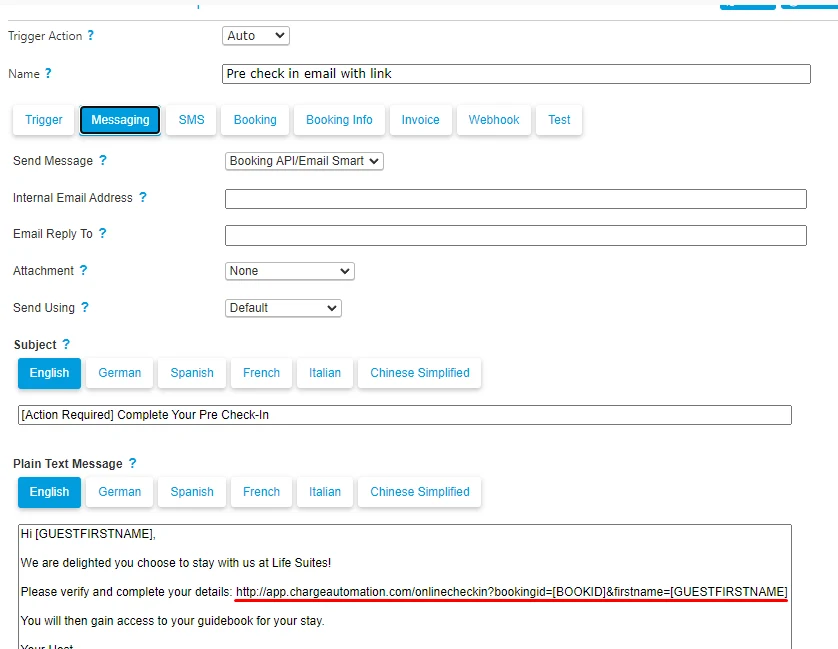
The actual Auto Action screen, with the Messaging tab selected. The tab bar shows everything an Auto Action can fire besides a message: SMS, invoice, webhook. Beds24's own wiki publishes no screenshots at all.
Screenshot published by ChargeAutomation in its Beds24 documentationTrigger tab · when the action fires
SETTINGS > GUEST MANAGEMENT > AUTO ACTIONS > Trigger
- Trigger Event
- Before Check-in
The reference point. The other values are
After Booking,Check-in,Check-outandAfter Check-out. - Trigger Time
- -3 days
The offset from that reference. This pair is what replaces the idea of "D-3".
- Time Window
How long the action stays eligible. Too narrow a window misses bookings created overnight.
- Booking Status
- All not cancelled
The most useful guard on the screen. Without it, a cancelled booking keeps receiving its arrival instructions.
- Booking Source
- All
Lets you reserve a sequence for one channel. The values cover
Direct,Booking.com,Expedia,Channel ManagerandIcal Import. - Between Booking and Check in
- 3
The minimum gap between booking and arrival. This is the field that prevents duplicates, covered below.
- Property
- All visible in account
Worth narrowing as soon as instructions differ between properties. A single action for the whole portfolio is where the generic message starts.
Messaging tab · what the action sends
SETTINGS > GUEST MANAGEMENT > AUTO ACTIONS > Messaging
- Trigger Action
- Auto
Manualprepares the action without running it. Useful if you want to watch a new sequence for a week before letting it go out on its own. - Subject
Used for email. On a platform inbox, only the body travels.
- Message Text
The body. Dynamic fields are codes in square brackets, replaced at send time.
The four codes used here come from the Template Variables page, cited in the sources. Copying a code from another platform does not fail: it shows to the guest exactly as written, brackets included.
The field that prevents duplicates
Between Booking and Check in is the setting sequences miss most often. It bounds the gap between the moment of booking and arrival.
Without it, a booking made two days out triggers the confirmation, the now pointless D-3 instructions and the morning message all on the same day. Set to 3 on the D-3 action, that action does not fire. A second action reserved for late bookings then takes over with a single message.
It is the Beds24 expression of a rule that applies everywhere, described with the full sequence in the six message templates.
What an Auto Action does not do
An Auto Action starts from a booking condition. An incoming message is not one. Everything that happens after the send therefore falls outside the mechanism, however carefully it is configured.


Connecting Sentioo on top of Beds24
Beds24 stays the source of properties, bookings and messages. The connection runs through an invite code, in two steps also covered in how it works.
Beds24Generate an API token
From Sentioo, the connection link opens the generation page with the scopes already ticked. Under Property Access, pick All owned or linked to account, then Generate invite code.
SentiooPaste the code
The code is pasted once. Properties and conversation history come across on their own after that.
You decide how far Sentioo goes- CopiloteThe reply is drafted and waiting for you. You review, you correct if needed, you send.
- HybrideSentioo replies on its own during your chosen hours and leaves the rest to you.
- AutopiloteThe reply goes out on its own. Anything outside the known scope comes back to you rather than being invented.
Who does what
| Beds24 Auto Action | Adapted message | Reply to the guest | |
|---|---|---|---|
| Fires on | A booking condition | The planned date | When the guest writes |
| Basis of the text | Template prepared in advance | Your original template | The thread and property instructions |
| Reads the thread | No | Yes | Yes |
| Role of Beds24 | The mechanism itself | Source of the data | Source of the data |
| Outside the known scope | To handle afterwards | Not applicable | Comes back to you |
A confirmation, arrival instructions, a departure reminder: Auto Actions cover that ground and are enough. Get one action working properly, then duplicate it. The need changes when guests reply a lot: it is no longer a trigger problem but a question of handling replies.
The settings that decide the real behaviour
After Booking, Before Check-in, Check-in, Check-out and After Check-out. They are not interchangeable, even when they seem to land on the same day. After Booking starts from an event that happens once, the reservation being recorded, while Before Check-in starts from a date that can still move. On a booking amended later, an action anchored to arrival follows the new calendar. An action anchored to the booking stays where it was.-3 days before arrival or +1 day after checkout. That pair replaces the "D-3" notion of hand-written sequences. The classic mistake is changing the anchor without changing the offset: switching from Before Check-in to After Check-out while keeping -3 days produces an action that fires three days before departure, which matches no intention at all. Always reread the two fields together.All not cancelled stops a cancelled reservation from continuing to receive its arrival instructions. It is a quiet defect: no error appears, only a message sent to someone who is not coming, often carrying an access code. The check is worth running across existing actions rather than new ones only, because a sequence built before any cancellation happened keeps its original setting.Direct, Booking.com, Expedia, Channel Manager and Ical Import. The most useful application is not tone by channel but avoiding duplicates: if a platform already sends its own confirmation, your action can exclude it and serve direct bookings only. The second is payment, whose terms differ between channels, which makes a single shared text almost always wrong somewhere.-3 days action stops it firing for a reservation made two days out. The setting is only complete with a second action, reserved for late bookings, merging confirmation and instructions into one send. Setting the bound without creating that second action produces the opposite of the intent: the guest in the biggest hurry receives the least information.Manual value prepares the action without executing it. It is the only way to see what a new sequence would do on real reservations before letting it run on its own. A week is usually enough to surface the two usual defects: a send landing at the wrong moment on a short stay and a dynamic field that does not resolve. The Test tab covers one-off checks, while Manual covers observation over time.Message Text, including anything that looks like a heading. The subject stays useful to you, though, as a sorting marker in your own inbox when you receive a copy of the send.