Smoobu's own support pages are the right reference for the menu path. In daily operations, the useful question is where the scheduler stops: how far it can send, what it can personalise and what happens once the guest replies. The labels and limits below were checked against Smoobu's documentation on 2026-08-06.
This article covers

What Smoobu means by a message template
In Smoobu, the unit is a message template. You set it under Experience > Communication, then open Create. Smoobu first shows Fill from a template with two choices: Use selected template or Create a message from scratch.
That distinction matters because Smoobu's automation is a scheduler. You prepare the text first, then attach timing rules to it. If you compare PMS behaviour across tools, Beds24 automated messages reaches the same destination through a different screen and different vocabulary.
The message template screen, field by field
A template can be broad or narrow: all properties or one, all portals or a selection. Useful, but it also means the generic version spreads unless you narrow it early.
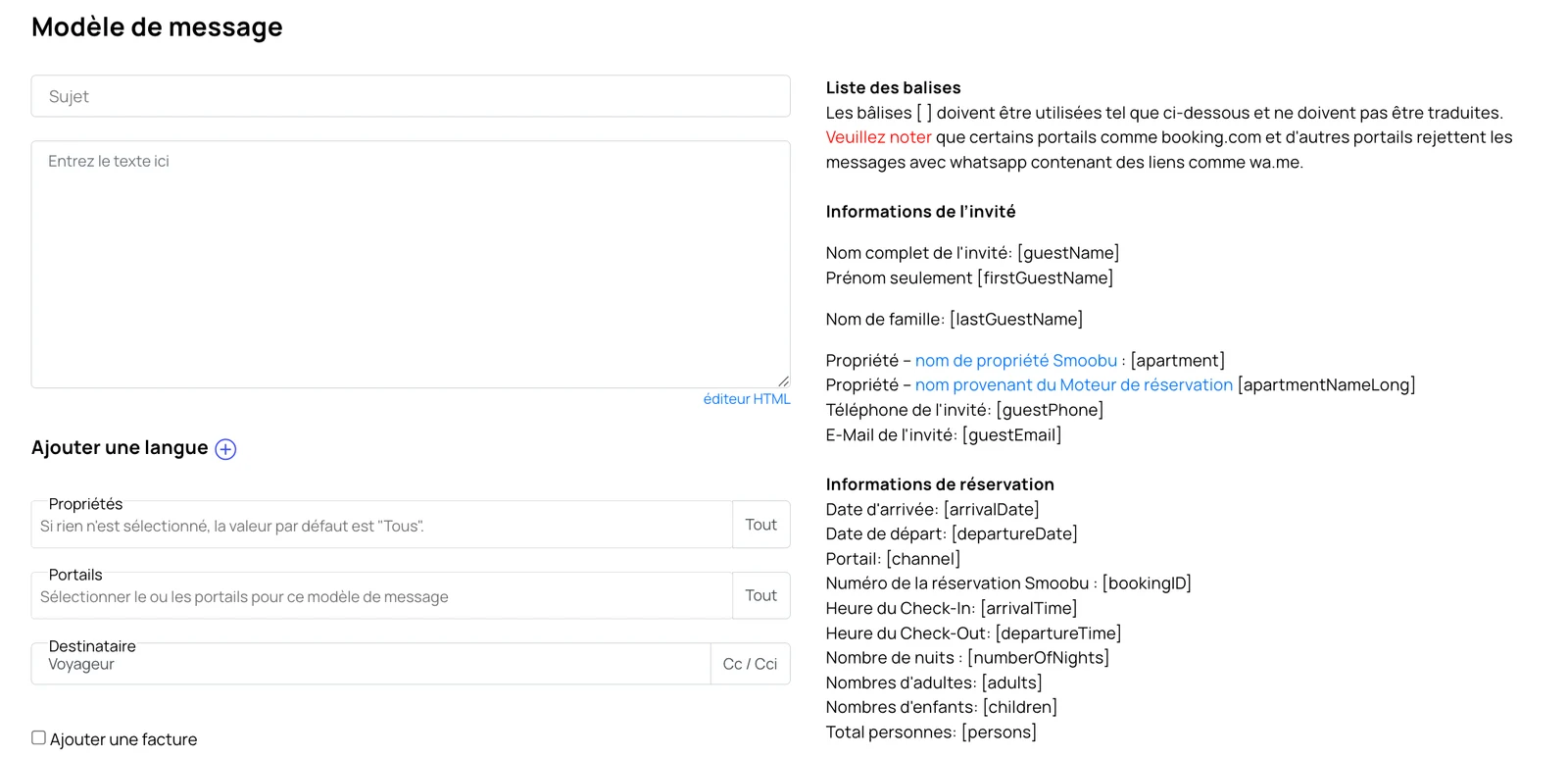
This is the real screen. The right-hand column lists the placeholders repeated below. The field-by-field breakdown follows, because a dense form screenshot does not read well on a phone. The interface is shown in French because that is where these labels were checked.
Screenshot published by Smoobu in its documentationMessage template
Experience > Communication > Create > Message template
- Subject
Used for email. On Airbnb and Booking.com threads, the body is what matters most.
- Enter text here
The body of the message. The "HTML editor" link changes editor mode. Dynamic fields stay in square brackets and are resolved when the message is sent.
- Add a language
Lets you keep another language version on the same template instead of duplicating the whole message.
- Properties
- All
If nothing is selected, Smoobu's default is "All". Restrict it as soon as instructions differ between properties.
- Portals
This is where you choose the portal or portals for the template.
- Recipient
- Guest
The default recipient is the guest. Cc and Bcc are configured here too.
- Add invoice
Adds an invoice attachment to the message.
- Payment reminder
Turns the message into a payment reminder.
One detail causes confusion later: the @host.smoobu.com alias belongs to email only. Airbnb and Booking.com messages still go out through the portals' own inboxes. Easy to miss if you test on email first and assume portal threads behave the same way.
The scheduling screen and the five triggers
Once the text exists, Send automatically is what turns it into a scheduled message. Smoobu then asks when the message should go out and what event it should be tied to.
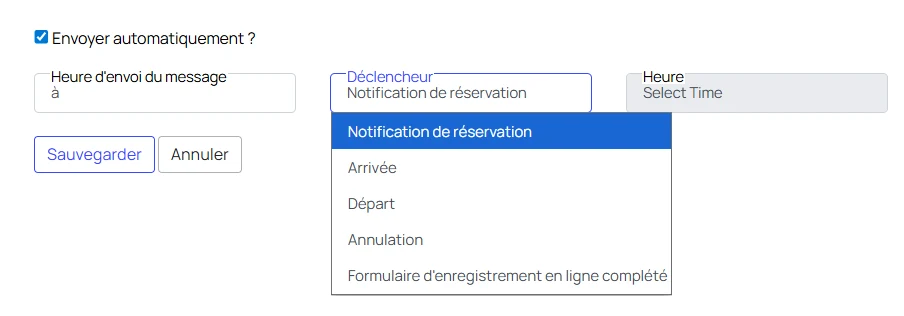
The Trigger menu is open on its five values, as Smoobu displays them.
Screenshot published by Smoobu in its documentationScheduling
Experience > Communication > Message template > Scheduling
- Send automatically
This turns a manual template into an automated send.
- Trigger
- Booking notification
The five trigger values are Booking notification, Arrival, Departure, Cancellation and Online check-in form completed.
- Time
This is where you place the sending hour relative to the chosen trigger. Save and Cancel finish the setup.
Those five triggers are the whole decision system. There is no conditional branch on this screen: you cannot say "send this only if the guest asked about parking" or vary the text depending on what the guest already answered in the thread.
Placeholders must stay exactly as Smoobu prints them
Smoobu's dynamic fields are literal codes in square brackets: [guestName], [firstGuestName], [lastGuestName], [apartment], [apartmentNameLong], [guestPhone], [guestEmail], [arrivalDate], [departureDate], [channel], [bookingId], [arrivalTime], [departureTime], [numberOfNights], [adults], [children] and [persons].
The rule is simple: do not translate them, shorten them or swap them for another tool's syntax. If the code is wrong, the guest sees the wrong code exactly as typed.
Keep the placeholders exactly as Smoobu writes them, brackets included. Do not translate them and do not mix them with variables copied from another PMS or channel.
The setting people miss: the 10-day ceiling
Smoobu's automated messages are often enough for confirmation, arrival and departure. The limit appears when the sequence needs to start earlier or end later.
There is also an option to send the email even when the trigger date has already passed. That matters for late bookings. Without it, a reservation made very close to arrival can miss part of the sequence.
This is where a layer on top of Smoobu earns its place. Programmed messaging keeps three system messages per reservation: welcome, check-in about a day before arrival and departure about a day before leaving. It also keeps any number of custom messages per property, placed from 30 days before arrival to 30 days after departure, each with a time slot and its own on or off switch. Each one can stay strict and go out word for word. Or it can be reinterpret, rewritten at send time in your tone and anchored to the original. Your template remains the reference version.
What Smoobu scheduling does not do after the send
A scheduled template finishes its job when it is sent. It does not read the guest's reply, it does not use the conversation history and it does not choose between branches based on what the guest just asked.
That is the gap between a scheduler and a reply layer. A reply reads the guest's message, the conversation history with an instruction not to repeat, the reservation status and phase, the stay dates and the property knowledge base built automatically and enriched over time. It also checks availability. Asked about its identity, the assistant presents itself as the property's assistant. It never pretends to be a person.


Smoobu schedules. It does not conduct the thread once the guest writes back. If your question is sequence design across channels, Airbnb automated messages covers that side of the same problem.
Connecting Sentioo on top of Smoobu
Smoobu stays the source of properties, bookings and portal messages. Sentioo sits on top to adapt programmed messages and handle replies. The wider behaviour is described in how it works.
SmoobuAPI settingsGenerate API Key
Generate the API key from Smoobu, then copy the key and the secret into Sentioo. Store the secret immediately: Smoobu shows it only once.
SmoobuWebhook
Paste the webhook URL provided by Sentioo into Smoobu's webhook field and enable the "New message" event. After that, new threads can reach Sentioo as they arrive.
You decide how far Sentioo goes- CopiloteSentioo prepares the reply and waits. You review it, adjust it if needed and send it yourself.
- HybrideSentioo alternates between draft-first and automatic replies according to the hours you set for each property.
- AutopiloteSentioo sends the reply on its own. If the question falls outside what the property knows, it comes back to you rather than being invented.
Who does what
| Smoobu automated message | Sentioo programmed message | Sentioo reply | |
|---|---|---|---|
| Starts from | Booking notification, arrival, departure, cancellation or completed online check-in | An arrival or departure offset, including the three system messages | An incoming guest message |
| Time range | Up to 10 days before arrival and 10 days after departure | From 30 days before arrival to 30 days after departure | Whenever the guest writes |
| Text at send time | Fixed Smoobu template | Your template in strict or reinterpret mode | Built from the thread, booking phase and property knowledge |
| Reads previous messages | No | In reinterpret mode, yes | Yes |
| Handles a reply | No | No | Yes |
| Sender identity | Email alias for email only, portal messages use the portal inbox | Uses the PMS message flow | Uses the PMS message flow |
| Outside the known scope | Not applicable | Your template remains the reference version | Passed back to you |
Used on its own, Smoobu covers the scheduled part well: write the template, place it near arrival or departure, keep the placeholders exact. The need changes when the sequence must reach beyond the 10-day window or when the guest replies and expects the next message to fit the thread rather than the template.
The screen settings, and what the 10-day ceiling decides
@host.smoobu.com address belongs to email. Airbnb and Booking.com messages go out through the portals' own messaging, under the host account identity. If you wanted one visible sender everywhere, the answer is no. Better to know that before building a signature around it. It also has a testing consequence: checking a send in your own mailbox proves nothing about what a guest arriving from a platform received.